
PMP Skilz: Master Real-World Computing. Anywhere, Anytime.
Empower students to learn Word, Excel, PowerPoint alternatives, creative digital arts, coding compilers, and AI prompt engineering without costly Microsoft 365 or software subscriptions. Available both as a native offline app for Windows & macOS, and a full cloud-based Windows 11 virtual desktop inside PMP LMS.
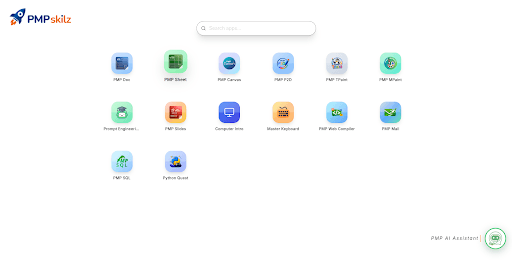
Instant single sign-on launcher with integrated AI Assistant & auto-grading
Experience PMP Skilz in Action
Watch how educators and students switch effortlessly between the offline computer lab desktop suite and the web-based virtual Windows 11 cloud environment.
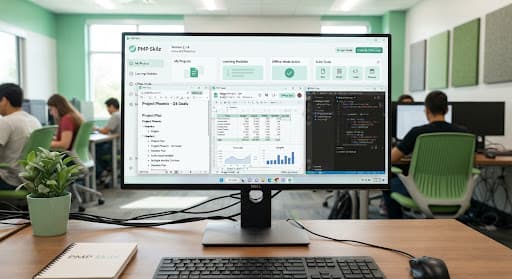
Offline Desktop Application
Designed for standard school IT labs without dedicated broadband. Install once via USB or network broadcast, and deliver full curriculum capabilities to student machines instantly.
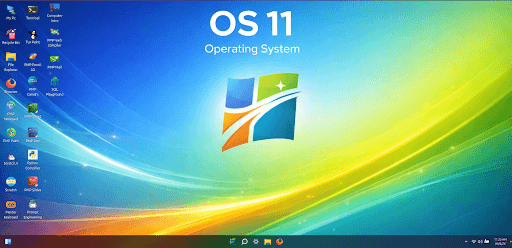
Online Virtual Windows 11 LMS
Allows students to practice in a realistic Windows 11 desktop right within Google Chrome or iPad Safari. Homework and assignments save straight to the student portfolio.
14 Purpose-Built K-12 Applications
Every tool is aligned with PM Publishers national curriculum frameworks—bridging introductory primary digital literacy to senior secondary computational engineering.
PMP Doc
Word Processing Alternative
Full rich-text editor with tables, header/footer formatting, spell checker, and .docx export. Teaches document design without M365 accounts.
PMP Sheet
Spreadsheet & Data Analysis
Cell formulas (SUM, AVERAGE, IF, VLOOKUP), interactive bar & pie charts, and data sorting exercises modeled after real-world corporate spreadsheets.
PMP Slides
Presentation Builder
Slide layout templates, transitions, shapes, speaker notes, and presentation rehearsal timers. Exports directly to PDF and interactive slide decks.
PMP Canvas & TPaint
Creative Digital Graphics & Tux Paint
Integrated vector drawing, paint buckets, stamp packs, magic textures, and kid-friendly audio feedback. Includes classic Tux Paint lessons for primary students.
Python Compiler & Quest
Sandboxed Programming IDE
Integrated Python 3.11 environment with interactive syntax highlight, gamified algorithm puzzles (Python Quest), and console I/O execution without installs.
Prompt Engineering Lab
Generative AI Ethics & Skills
Interactive sandbox guiding students in structured prompting, bias detection, and logical verification. Includes built-in safety filters for school safety.
PMP Web Compiler
HTML5, CSS3 & JavaScript Studio
Real-time split-screen web page rendering. Students type HTML & CSS tags with immediate DOM updates, live previewing, and asset manager.
PMP SQL Playground
Relational Database Simulator
Practice SELECT, INSERT, UPDATE, JOIN, and schema modeling on pre-seeded school, sports, and library tables without configuring complex database servers.
Master Keyboard & Intro
Touch Typing & Computer Basics
Ergonomic finger placement, gamified typing sprints (WPM and accuracy metrics), and interactive hardware tours (CPU, RAM, input/output peripherals).
BlocksBuddy Studio
Visual Block Programming
Scratch-compatible block IDE allowing younger learners to snap together algorithmic sequences, broadcast events, create animations, and build mini arcade games.
Algorithm Flowchart Lab
Logic & Process Sequencing
Interactive diagramming studio with standard ANSI flowchart symbols, condition branching tests, and live step-by-step code execution tracing.
Logic Gate & Circuit Lab
Boolean Logic & Hardware Simulator
Wire AND, OR, NOT, NAND, XOR gates and truth tables to visualize CPU fundamentals and binary arithmetic without physical lab hardware.
Digital Audio & Wave Studio
Sound Design & Podcasting
Multi-track kid-safe sound editor. Students record oral school presentations, trim audio clips, add background ambient loops, and export MP3 formats.
3D Spatial & Geometry Modeler
Introductory 3D Visualization
Build polyhedrons, 3D architectural mockups, and spatial coordinates. Enhances spatial reasoning through intuitive rotate, scale, and mesh extrusion tools.
Offline Desktop vs. Online Virtual OS
Choose what works best for your campus infrastructure—or deploy both concurrently so students learn in labs and review seamlessly at home.
Test Drive OS 11 in Your Browser
Click on the desktop icons or the floating windows to experience how students interact with the virtual lab environment.
OS 11
Operating System
The Solar System and Planetary Motion
Earth orbits the sun at an average distance of 149.6 million kilometers. Through PMP Doc, learners practice heading styles, bullet points, and image insertion without requiring external office licensing.
- Mercury: Smallest terrestrial planet with extreme craters
- Venus: Hottest planet wrapped in dense sulfuric clouds
- Earth: Dynamic atmosphere sustaining biological life
| Student Name | Term 1 | Term 2 | Total |
|---|---|---|---|
| Aarav Sharma | 88 | 92 | 180 |
| Priya Patel | 94 | 96 | 190 |
| Rohan Verma | 85 | 89 | 174 |
| Class Mean: | 89.0 | 92.3 | 181.3 |
Zero Microsoft License Fees. Instant Lab Setup.
Schools typically spend thousands of dollars per lab per year maintaining enterprise office and coding software. PMP Skilz removes this barrier entirely.
Single MSI / Network Installer
Deploy across 50+ lab computers in minutes using Windows Group Policy, PDQ Deploy, or USB offline clone.
Safe Walled Garden Sandbox
Students cannot access unauthorized web domains, external downloads, or alter machine registry settings during lab periods.
1:1 Textbook Curriculum Alignment
Every screenshot and chapter exercise in PM Publishers IT books matches PMP Skilz buttons and toolbars exactly.
Dual deployment flexibility for Indian & Global schools
Computer Lab (Offline)
Computers run PMP Skilz natively. No student accounts needed. Fast local file saving and zero bandwidth strain.
Home & Hybrid (Virtual OS)
Students log in via PMP LMS. Open virtual OS 11 on any home device, finish school labs, and submit for teacher review.
"We transitioned 60 computer lab systems to PMP Skilz. It solved our Microsoft licensing cost while giving students identical Word, Excel, and coding practice."
— Senior IT Coordinator, Delhi NCR InstitutionEquip Your School with PMP Skilz
Schedule an institutional walkthrough with our curriculum engineers or download the free offline desktop installer package for your school IT lab.
Complimentary for schools adopting PM Publishers Computer Series. No credit card or software license required.